ATS Friendly CV Template: 7 Steps to Beat the Bots & Get Hired
The choice of an ATS friendly CV template is the single most critical decision you will make during your job hunt. Before you write a single word of your summary or list your first job achievement, the structure you choose determines whether your application will ever be seen by human eyes.
Have you ever applied for a job you were perfect for, only to hear absolutely nothing back? It’s a crushing feeling. You spend hours tailoring your cover letter, polishing your experience, and dreaming about the role. You hit “Submit,” and it feels like your application vanishes into a black hole. The reality is painful: it likely did vanish. But not because you lack talent. It happened because your resume failed the technical exam administered by an Applicant Tracking System (ATS).
In this extensive guide, we are going to dismantle the mystery of the “bot gatekeepers.” You will learn exactly how to select and optimize an ATS friendly CV template that guarantees your skills are parsed, ranked, and delivered straight to a recruiter’s inbox.
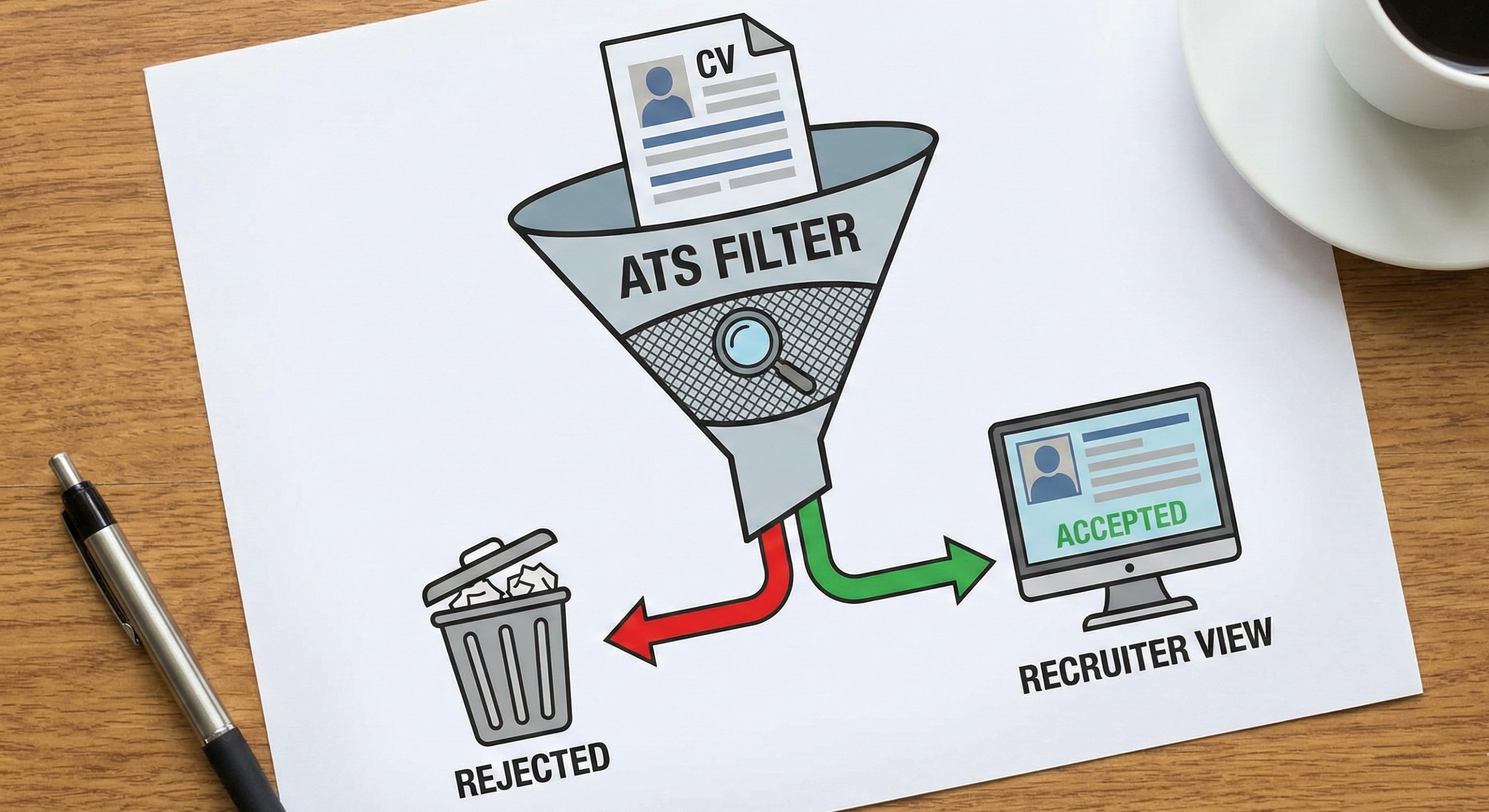
Table of Contents
1. What Is an ATS and Why Is It Rejecting You?
To master the game, you first have to understand the rules. An Applicant Tracking System (ATS) is a type of software used by recruiters and employers to collect, sort, scan, and rank the job applications they receive.
The Scale of the Problem
It is estimated that over 98% of Fortune 500 companies use an ATS. However, it is not just the giants; small and medium-sized enterprises (SMEs) are increasingly adopting these tools to manage the flood of applications brought on by remote work and easy-apply buttons. When you apply online—whether through LinkedIn, Indeed, or a company portal—your CV goes directly into this database. According to research by Jobscan, these systems are now the standard gatekeepers for nearly all corporate jobs.
How Parsing Works
This is where the ATS friendly CV template becomes vital. When you upload your document, the ATS “parses” it. Parsing is the process of stripping away your formatting to extract raw data. The software scans the document for specific markers:
- Contact Information: It looks for patterns like phone numbers and email addresses.
- Work History: It searches for dates and job titles.
- Education: It identifies degree types and university names.
If your template uses complex design elements—like tables, graphics, or non-standard fonts—the parser gets confused. It might read your “Skills” section as part of your “Education,” or worse, it might return an error and leave your profile blank. If the ATS cannot read your data, it automatically ranks you as a 0% match. You are rejected before a human even knows you exist.
2. The Anatomy of a Perfect ATS Friendly CV Template
Finding the right template is not about finding the prettiest one. In fact, “ugly” or “boring” resumes often perform better in the initial scan. Here is the technical breakdown of what makes a template safe for bots.
Simplicity is King: The Single-Column Layout
The most common mistake candidates make is using multi-column layouts. Visually, two columns look organized. You might have your contact info and skills on the left, and your experience on the right.
However, many older ATS parsers read linearly, from left to right, line by line.
- The Error: The bot reads the first line of the left column, then immediately reads the first line of the right column.
- The Result: Your resume becomes a jumbled word salad. “Project Manager” from the right column might merge with “Spanish Speaker” from the left column, creating a nonsensical job title.
To ensure safety, your ATS friendly CV template must use a single-column layout. This forces the parser to read your career story in the correct chronological order.
Standard Headings Are Mandatory
You might want to show some personality by naming your work experience section “My Journey” or “Where I’ve Been.” While this sounds creative to a human, it is invisible to a robot.
ATS algorithms are programmed to recognize specific, standard headers. If the bot doesn’t see “Work Experience,” it might not know where your job history begins. Stick to the industry standards:
- Work Experience or Professional Experience
- Education
- Skills or Core Competencies
- Summary or Professional Profile
Font and Typography
Your choice of font is about more than aesthetics; it is about character recognition. An ATS friendly CV template should utilize standard, web-safe fonts. Serif or Sans-Serif are both acceptable, provided they are common.
Safe Fonts Include:
- Arial
- Calibri
- Helvetica
- Roboto
- Times New Roman
- Verdana
Avoid distinct script fonts or “handwritten” styles. Furthermore, ensure your font size is readable. Use 10-12 points for body text and 14-18 points for headers. You can learn more about choosing the best fonts for resumes to ensure both human and machine readability.
3. Critical Elements to Include in Your ATS Template
Once you have secured a compliant structure, the next step is populating it with content that ranks high. This is where Search Engine Optimization (SEO) meets career management. You need to optimize your resume keywords just like a marketer optimizes a website.
Keyword Optimization: Speaking the Robot’s Language
The ATS scores your resume based on how well it matches the job description. It does this by counting keyword frequencies.
If a job description asks for “Search Engine Optimization,” “Content Marketing,” and “Google Analytics,” those exact phrases must appear in your CV.
- Exact Match Matters: If you write “SEO” but the job description says “Search Engine Optimization,” smart bots will catch it, but older bots might not. It is safest to use both: “Search Engine Optimization (SEO).”
- Context: Do not just list keywords. Weave them into your bullet points. Instead of just listing “Project Management,” write: “Executed Project Management methodologies to deliver campaigns on time.”
Contact Information Placement
In a standard document, the Header and Footer sections are useful for repeating information. In an ATS friendly CV template, they are danger zones.
Many parsers ignore information contained in the header or footer of a Word document or PDF. If you place your name, email, and phone number in the actual Header section of the document, the ATS might import your resume as “Anonymous.”
- The Fix: Place your contact details at the very top of the body of the document. Ensure they are written as text, not as an image.
Bullet Points and Special Characters
When listing your duties, use standard bullet points (solid circles or squares).
- Avoid: Arrows, checkmarks, diamonds, or emojis.
- Why: These special characters can be rendered as “junk text” (e.g.,
&%#*) by the parser, messing up the formatting of your sentences.
4. The File Format Debate: Word vs. PDF
This is perhaps the most debated topic in the recruitment world. Should you submit a PDF or a Word document (.docx)?
The Case for Word (.docx)
For the highest level of safety, a .docx file is the gold standard for any ATS friendly CV template.
- Pros: It is the easiest format for software to parse. The text structure is clear, and there are rarely issues with character recognition.
- Cons: Formatting can sometimes shift if the recruiter opens it on a different version of Word or a mobile device.
The Case for PDF
PDFs are preferred by designers because they “lock” the formatting in place.
- Pros: Your resume looks exactly how you intended it to look, regardless of the device.
- Cons: Some older ATS platforms treat PDFs as images. If the software can’t highlight the text, it can’t read it.
The Verdict: Unless the job application specifically says “PDFs Only,” stick to a .docx format to be 100% safe. If you must use PDF, ensure it is a text-based PDF (convert from Word) and not an image-based PDF.
5. Top 5 Mistakes That Ruin an ATS Friendly CV Template
Even with the best intentions, you can accidentally sabotage your application. Here are the five most common pitfalls that result in an automatic rejection.
1. The “Text Box” Trap
This is the silent killer of resumes. In Microsoft Word, text boxes are distinct elements separate from the main document body. Many parsers simply skip over them. If you put your “Key Skills” or “Summary” inside a text box to make it look nice, the ATS might see that entire section as blank space.
- Solution: Use tabs and spacing to align text, never text boxes.
2. Over-Designing with Graphic Tools
Tools like Canva or Photoshop are fantastic for creating brochures, but risky for resumes. They often export text in layers that confuse parsers. A visually stunning resume that ranks 0% on the ATS is worthless compared to a plain resume that ranks 95%.
3. Charts and Skill Bars
You have likely seen templates that use “progress bars” to denote skill level (e.g., a bar filled 80% for “Java”).
- The Problem: Robots cannot “see” the percentage on the bar. They just see the word “Java.” They don’t know if you are an expert or a beginner.
- The Fix: Use text descriptors. “Java (Advanced)” or “Java (5 years experience).”
4. Typos in Critical Keywords
If the job requires “Accounting,” and you accidentally type “Accountng,” you will not get credit for that keyword. The bot is literal. It does not forgive spelling errors.
- Solution: Run a spell check, but also manually read your keywords backwards to catch errors your brain might skip.
5. Including Headshots or Photos
Unless you are applying for a modeling or acting job, or working in a country where photos are mandatory (like parts of Europe or Asia), remove your photo.
- The Risk: Photos can confuse the parser (appearing as a garbled attachment). More importantly, many US and UK companies automatically discard resumes with photos to avoid potential lawsuits regarding discrimination laws, adhering to guidelines from the U.S. Equal Employment Opportunity Commission (EEOC).
6. How to Test if Your CV Template is Truly ATS Friendly
You do not have to cross your fingers and hope for the best. You can validate your ATS friendly CV template before you send it.
The “Select All” Test
This is a quick manual test you can do right now.
- Open your resume file.
- Press
Ctrl + A(Windows) orCmd + A(Mac) to select all the text. - Copy the text.
- Open a plain text editor (like Notepad on Windows or TextEdit on Mac).
- Paste the text.
Analyze the Result:
- Is the text readable?
- Are the sections in the right order?
- Is your contact info at the top?
- Are there weird symbols or code snippets?
If the text in Notepad looks clean and organized, your template is likely ATS friendly. If it looks like a jumbled mess, you need to simplify your formatting.
Use Online Scanners
There are several reputable tools designed to simulate an ATS scan.
- Jobscan: Allows you to upload your resume and a job description to see how well they match.
- Resume Worded: Scores your resume based on recruiter criteria and provides instant feedback.
- TopResume: Offers a free critique of your resume’s scannability.
7. Optimizing for “Soft Skills” vs. “Hard Skills”
While the ATS friendly CV template handles the structure, balancing your content is equally important. ATS algorithms look for two types of keywords: Hard Skills and Soft Skills.
Hard Skills
These are teachable abilities or skill sets that are easy to quantify.
- Examples: Python, SEO, Data Analysis, Bilingual (Spanish/English), Forklift Certified.
- ATS Strategy: These are usually the most heavily weighted keywords. Ensure these appear in a dedicated “Skills” section for easy parsing.
Soft Skills
These are subjective skills that are harder to quantify, also known as “people skills.”
- Examples: Leadership, Communication, Adaptability, Time Management.
- ATS Strategy: Avoid listing these in a bulleted list where they look like fluff. Instead, weave them into your work experience.
- Bad: “Good leadership skills.”
- Good: “Demonstrated leadership by supervising a team of 10 marketing specialists.”
By integrating soft skills into your job descriptions, you provide context that the semantic search algorithms of modern ATS platforms reward.
8. Tailoring Your ATS Friendly Template for Different Industries
Not all industries use the same ATS parameters. Depending on your field, you may need to tweak your ATS friendly CV template.
The Corporate World (Finance, Law, Admin)
Here, conservatism wins. Use the strictest, simplest templates. Times New Roman or Arial font. Zero colors. Focus heavily on metrics and years of experience. The ATS settings for these companies are often set to filter strictly for credentials (e.g., “CPA license” or “MBA”).
The Tech Sector (Development, IT, Engineering)
Tech companies often use more sophisticated ATS (like Greenhouse or Lever). These systems are better at parsing, but they prioritize specific technical stacks.
- Tip: Create a “Technical Skills” section that is distinct from general skills. Group your skills by category (e.g., “Languages: Java, C++”; “Tools: Jira, Git”). This helps the ATS categorize your abilities correctly.
The Creative Fields (Marketing, Design, Writing)
This is the trickiest area. You need a portfolio, but you also need to get past the gatekeeper.
- The Hybrid Approach: Use a strictly ATS friendly CV template for the online application upload. However, include a clickable link to your online portfolio or personal website in your contact section. This satisfies the robot (who reads the text) and the human (who clicks the link to see your designs).
9. FAQ: Common Questions About ATS Friendly CV Templates
Q: Can I use color in an ATS friendly template? A: Yes, but use it sparingly. Using dark blue or dark green for headers is usually fine. Avoid using white text (to hide keywords) or light colors that might not scan well if the recruiter prints the document in black and white.
Q: How far back should my work history go? A: Generally, the last 10 to 15 years is sufficient. If you go back too far, the ATS might calculate your “experience level” as “overqualified,” or the algorithms might deem the experience irrelevant.
Q: My name is difficult to spell. Will that hurt my ATS ranking? A: No, the ATS does not judge your name. However, ensure your name on the resume matches the name you use in the application form exactly. If the form asks for “legal name” and your resume uses a nickname, it could create a duplicate profile or a mismatch error.
Q: Should I use a functional or chronological resume? A: Always stick to Reverse-Chronological (most recent job first). Functional resumes (which focus on skills rather than dates) are notoriously difficult for ATS parsers to read. They often result in the system thinking you have zero years of experience because it cannot link your skills to specific dates of employment.
Q: Is there a “universal” ATS template? A: The closest thing to a universal template is a clean Word document with 1-inch margins, Arial font, and standard headers. You can find excellent, compliant options in the Microsoft Office Template Gallery, specifically the “Plain” or “Basic” designs.
Conclusion: Take Control of Your Career
The job search process can feel cold and mechanical. It is easy to feel like a number in a database. But understanding the mechanics of that database gives you the power to change the outcome.
An ATS friendly CV template is more than just a document; it is a key. It is the tool that unlocks the door, allowing you to bypass the digital bouncer and present your case to a real human being. It is not about stifling your creativity or stripping away your personality; it is about ensuring your professional story is actually heard.
Your Next Step: Don’t let a robot decide your future for one more day.
- Open your current CV right now.
- Run the “Select All” and paste into Notepad test.
- If it looks scrambled, download a clean, single-column ATS friendly CV template immediately.
- Re-format your content, optimize your keywords, and hit “Apply” with confidence.
You have the skills. You have the experience. Now, make sure the world—and the robots—know it.